When only one earbud plays sound, it’s tempting to assume it’s broken. Usually it isn’t. Most one-sided earbud problems come from a flat battery, a broken link between the two earbuds, a balance setting on your phone or computer, or dirt in the speaker mesh, and all of those are free to fix. Work through the steps below in order.
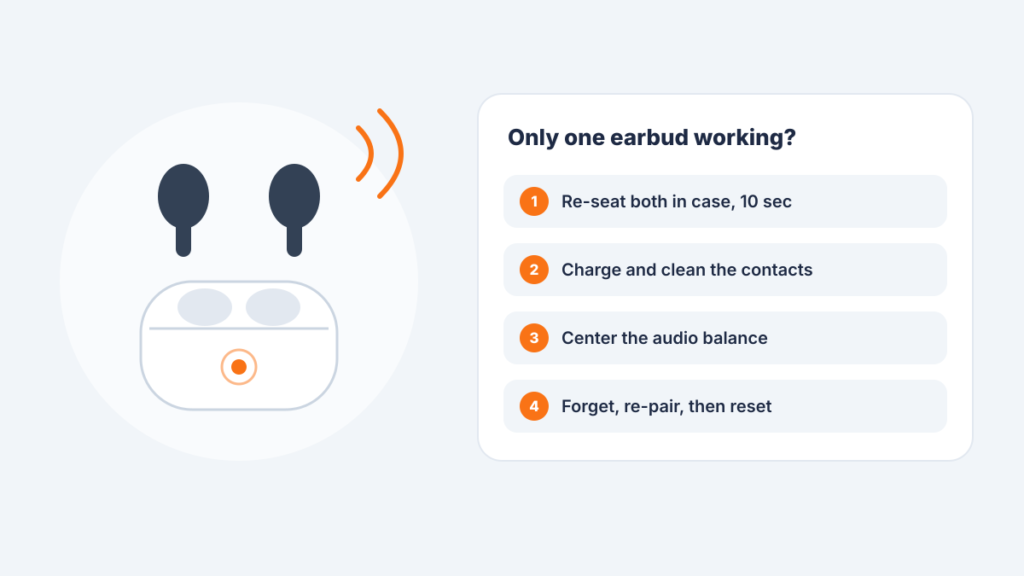
Quick answer: Put both earbuds in the charging case, shut the lid, wait about 10 seconds, then remove them together. If one side is still silent, check that it’s charged, set the audio balance to the center on your device, forget the earbuds in Bluetooth settings and pair them again. If that fails, reset the earbuds.
Why only one earbud works
- One earbud is flat. It didn’t charge because of dirty contacts or a loose fit in the case.
- The earbuds lost their link. Many true wireless earbuds relay audio from one earbud to the other, while others connect to your phone separately. Either way, if a link drops, only one side plays.
- One earbud paired separately. Your phone may show two entries, such as a name ending in “-L” and another ending in “-R”.
- An off-center balance setting. Audio can be sent entirely to the left or right through your device’s accessibility or sound settings.
- Blocked speaker mesh. Earwax or dust covers the speaker opening.
- A hardware fault. Water damage or a failed battery, which is less common.
Fix 1: Re-seat both earbuds in the case
- Put both earbuds in the case and make sure each one clicks into place.
- Close the lid and wait about 10 seconds.
- Open the case and take both earbuds out together.
This restarts both earbuds and lets them reconnect to each other. It’s the fastest fix and works surprisingly often.
Fix 2: Charge the silent earbud
- Wipe the metal charging contacts on the earbud and inside the case with a dry, lint-free cloth.
- Put the earbuds back and check that the case’s charging light comes on.
- Leave them to charge for at least 30 minutes.
- Check each earbud’s battery in your phone’s Bluetooth settings or the earbuds’ app, if it shows one.
Fix 3: Center the audio balance
iPhone: Go to Settings > Accessibility > Audio & Visual and drag the Balance slider to the middle. Make sure Mono Audio is off.
Android: Go to Settings > Accessibility and look for Audio adjustment, Hearing enhancements or Audio balance, depending on your phone. Center the left/right slider.
Windows 11:
- Open Settings > System > Sound.
- Under Output, select your earbuds.
- Check that the Left and Right volume levels match.
- Turn off Mono audio if it’s on.
Mac: Open System Settings > Sound > Output, select your earbuds and center the Balance slider.
Fix 4: Forget and re-pair the earbuds
- Open Bluetooth settings on your phone or computer.
- Forget or remove the earbuds. Delete any separate left and right entries too.
- Put both earbuds in the case for a few seconds, then take them out together. If they don’t show up, start pairing mode with your model’s button or case steps.
- Pair the earbuds again, choosing the main name only.
On Windows, earbuds that use LE Audio can end up with only one side connected if pairing doesn’t finish properly. Remove the earbuds and pair them again, and if Windows asks to connect the second earbud, accept the prompt.
Fix 5: Clean the speaker mesh
Look at the silent earbud’s speaker opening. If it’s clogged:
- Remove the ear tip if it comes off.
- Gently brush the mesh with a soft, dry toothbrush.
- Clean the ear tip separately with a slightly damp cloth and let it dry fully.
Don’t push anything into the mesh and don’t use liquid directly on the earbud.
Before you reset anything, open the brand’s app and install any firmware update. Old firmware can cause dropouts and one-sided sound.
Fix 6: Reset the earbuds
A reset makes the earbuds forget every device and rebuild the link between them. Delete the earbuds from your devices first, then follow your model’s reset steps. See our guide on how to reset wireless earbuds for the most common methods, or the brand guides for TOZO, Skullcandy and soundcore.
Fix 7: Test with another device
Pair the earbuds with a different phone or computer and play a stereo song.
- Both sides work: The problem is a setting or Bluetooth issue on your original device.
- Still one side: The earbud itself probably needs repair or replacement. Check the manufacturer’s warranty for your model before paying for a repair or replacement.
Related guides
Frequently asked questions
How do I fix my earbuds if only one works?
Put both in the case for 10 seconds, take them out together, and make sure both are charged. If that doesn’t work, center the audio balance, re-pair them and reset them.
Why would only one earbud be working?
Most often one earbud is flat, the two earbuds lost their connection to each other, or a balance setting sends sound to one side.
Can I use just one earbud?
Many earbuds support mono or solo mode, so you can use either one on its own. Check your earbuds’ manual or app.
How do I fix a dead earbud?
Clean its charging contacts and charge it for at least 30 minutes. If it still won’t turn on or connect after a reset, it likely has a battery or hardware fault.
Conclusion
A silent earbud is rarely the end of the road. Re-seat both earbuds, charge them, check the balance setting and re-pair them, and most people never need to go further. Save the reset for when those steps don’t work, and test with a second device before you buy a replacement.